Solutions · Kebab and döner shops

POS for kebab shops: take payment at the counter, the grill sees it instantly

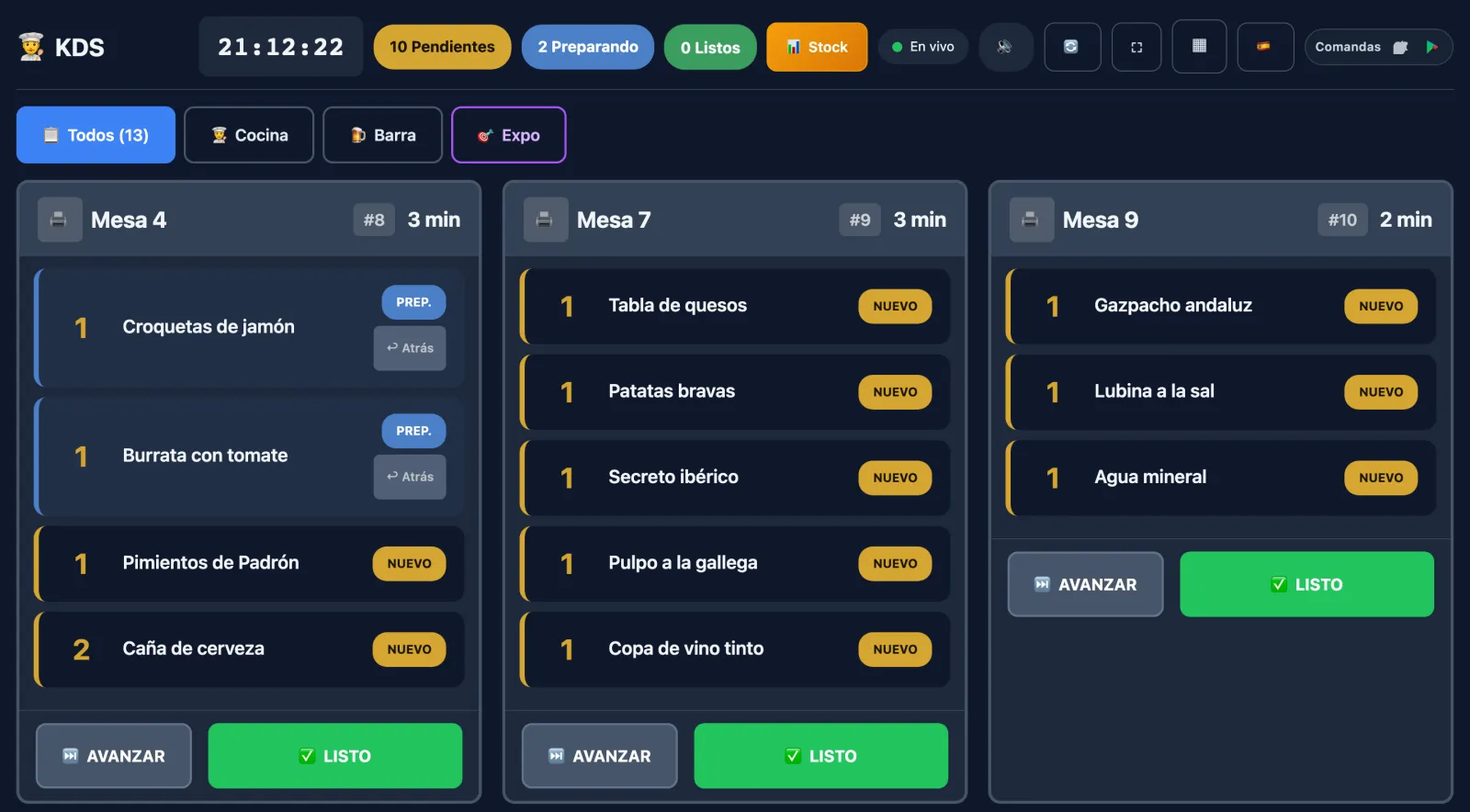
You take payment at the counter and the order prints in the kitchen or shows on the grill's screen, with the meat, sauces and extras attached to each dish. Pickup and delivery orders from your own website go to the same kitchen and the same till.

Free to try · No card · No lock-in

  • Counter
  • Kitchen printer or display
  • Meat, sauces and extras
  • Pickup and delivery
  • Integrated card terminal
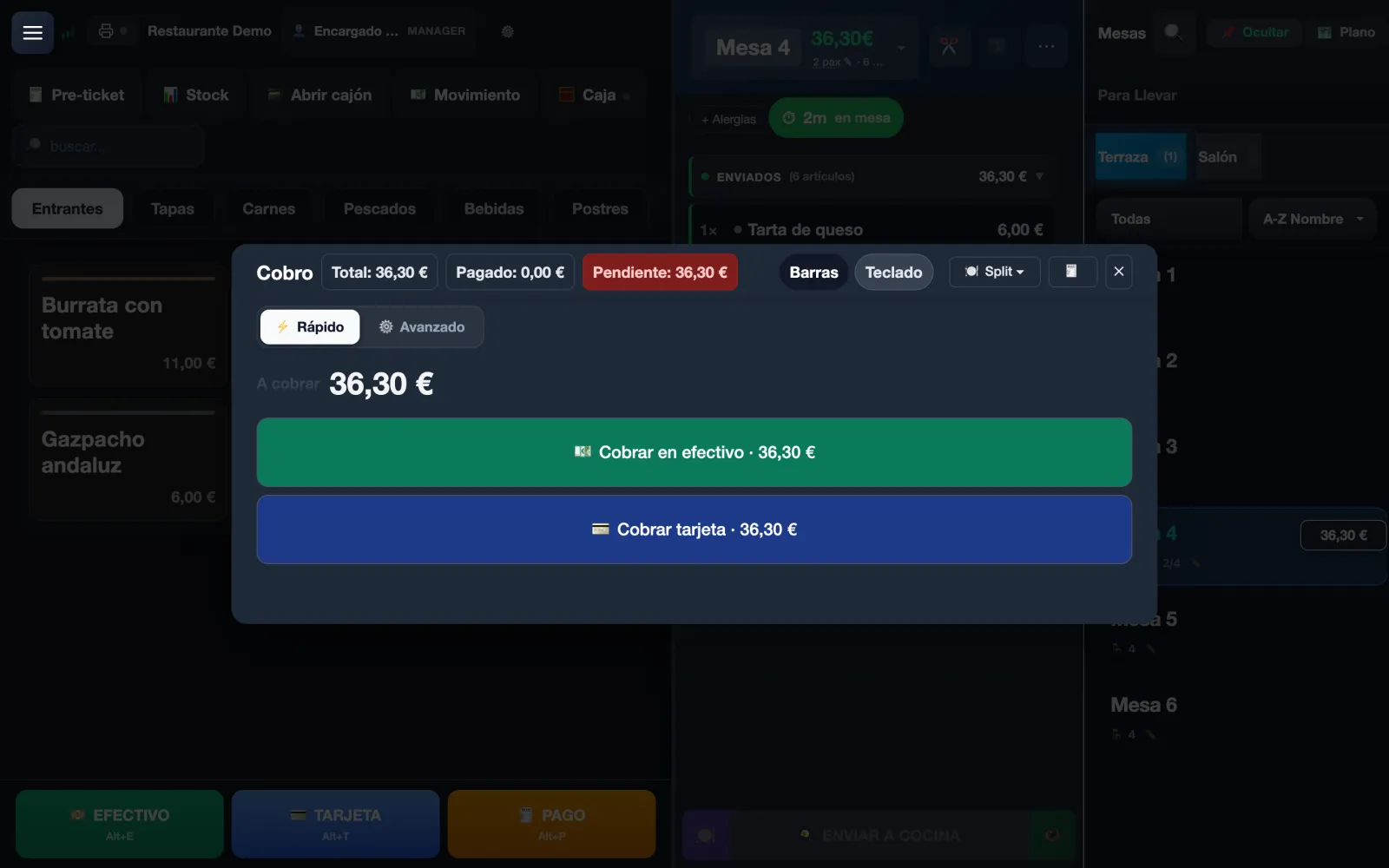
Quick payment on the Mesero POS: total, paid and pending in view, with the buttons to charge in cash or by card.
Example
A real Mesero POS screen with demo data; around it, examples of what happens in a kebab shop at rush hour.
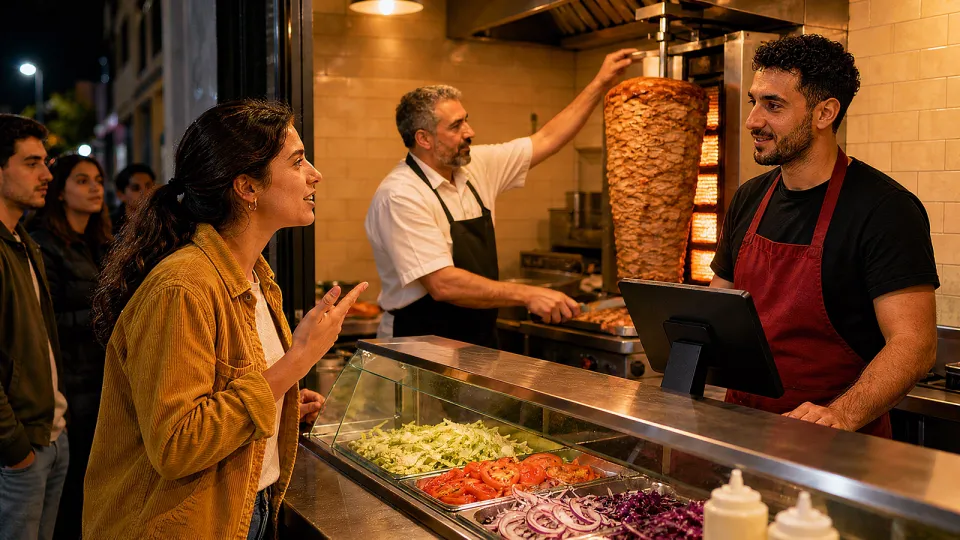
A kebab shop at night: the queue reaches the street, the cook carves the meat from the spit at the grill and a customer orders at the counter, by the till.

9:30 pm · DinnerThe queue reaches the street, it's paid on ordering and the grill already has the order.

What a kebab shop needs

Take payment fast without the grill losing an order.

In a kebab shop almost everything is paid before it is cooked, and almost everything comes with changes: another meat, another sauce, no onion. This is what Mesero does there.

You charge, the order goes out

Takeaway opens a numbered ticket. When you press «Charge», the POS sends the order to the kitchen and charges, or asks first «Send to the kitchen and charge», as you choose in the settings. It prints in the kitchen or shows on the kitchen display.

The meat, the sauces and the extras

Kebab, dürüm, plate or box, each with its modifiers: beef, chicken or mixed, the sauces, and extras with their price, which add up on their own. «No lettuce» or «extra cheese» stay attached to their line, in the kitchen and on the receipt.

Pickup and delivery, on your website

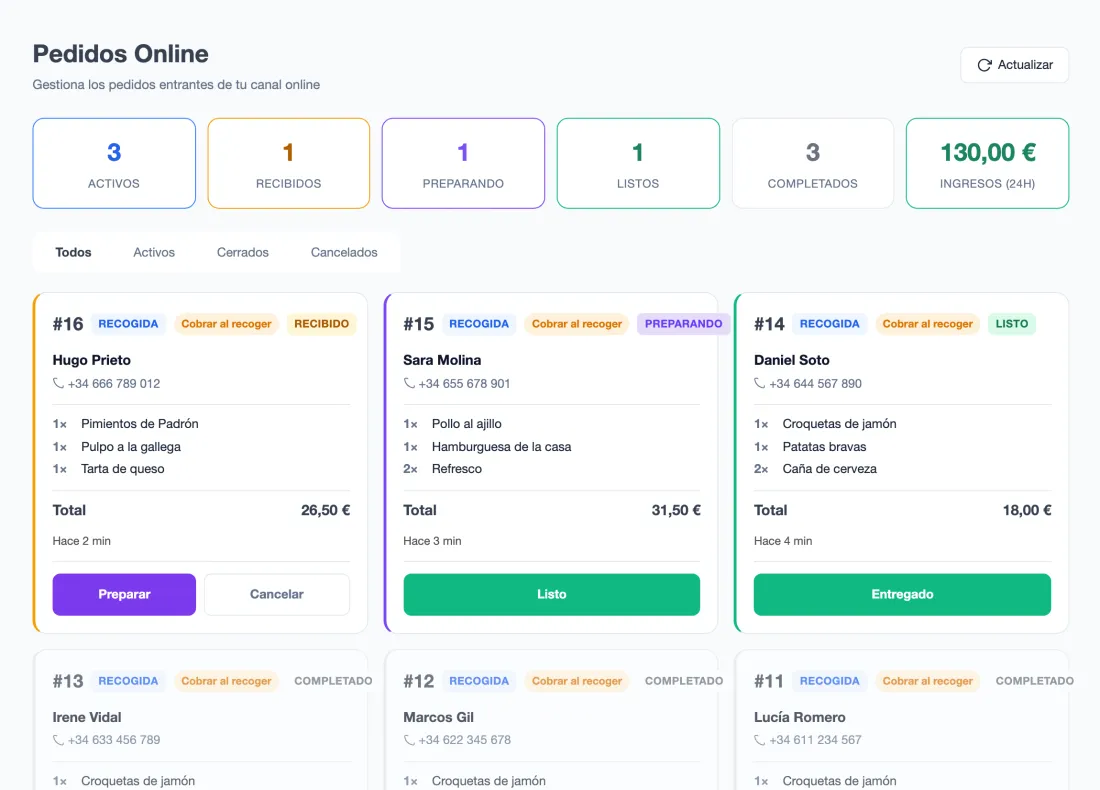
With online ordering on the Pro plan, guests order from their phone on your own website, for pickup or delivery, with your delivery zones, their fee and their minimum order. It reaches the kitchen and the POS like any other order, with no commission on the order.

Integrated card terminal

With a Comercia terminal, whatever your bank, Mesero Comandas sends it the amount and the approved payment is recorded on the ticket: nobody types the amount. Included on every plan, with no Mesero commission per payment.

A kiosk, if you want to clear the queue

The self-service kiosk runs on any touch screen, with no fee per kiosk, on the Pro and Enterprise plans. It offers the meal deal and the drink, and the required choices can't be skipped.

The till balances, the receipt complies

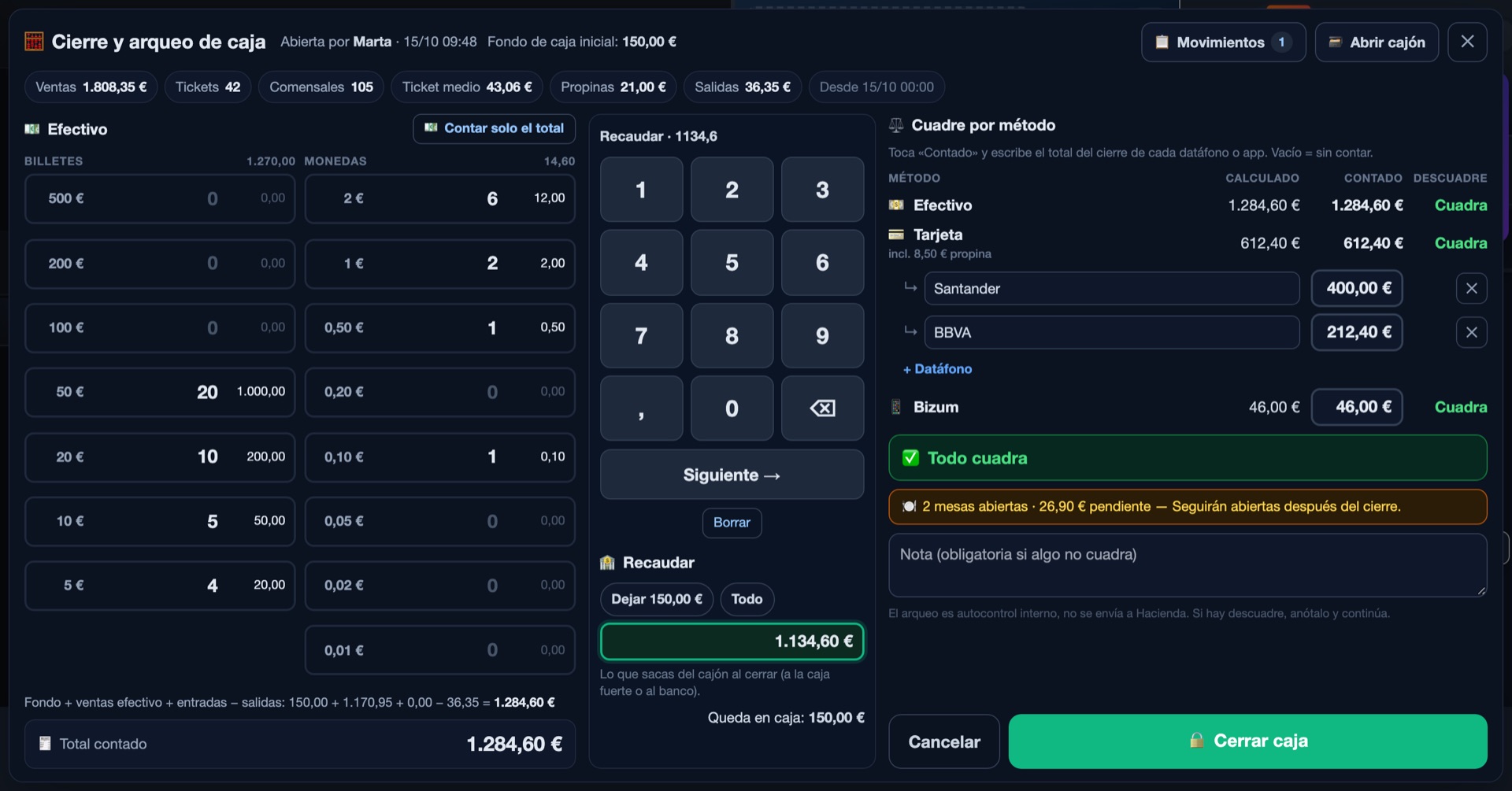
At closing you count cash by note and reconcile each card terminal and Bizum with cash control. Receipts are issued with VeriFactu. On every plan.

A day in your kebab shop

From the lunchtime queue to the cash close.

This is how a day in a kebab shop runs on Mesero, with its real screens (Spanish interface) and example data. Scroll slowly: the clock moves with you.

  1. · Rush hour

    The dürüm, paid and on the grill

    No tables to open: Takeaway creates a ticket by number, and what sells most sits in Recent. When you press «Charge», the order goes to the kitchen with the payment, or the till asks first, as you choose in the settings.

    «Mixed dürüm, yogurt sauce, no onion, extra cheese»: each change sticks to its line, with its price if it has one, in the kitchen and on the ticket.

  2. · Grill

    The grill sees only its part

    Counter and website orders land on the same kitchen display. Each category goes to its area and, within it, to its station: the grill sees the dürüms and plates, the fryer the chips, and nobody reads the whole order looking for theirs.

    The kitchen display comes with the Starter plan and up, with no licence per screen. If you prefer paper, the order prints on the kitchen's thermal printer.

  3. · Delivery dinners

    Your website's orders, on time

    With online ordering on the Pro plan, guests order from their phone on your website, for pickup or delivery, with a realistic estimated time. The order appears in the panel and in the kitchen like any other, and you move it along until it's handed over.

    If they tick it when ordering, guests get a WhatsApp message when the order is ready for pickup or on its way. No commission on the order: a card payment through Mesero carries only Stripe's fee.

  4. · Close

    The till, counted and explained

    You count the cash by notes and coins, and Mesero compares it with what the sales, each card terminal and Bizum say. If something doesn't match, you see in which method and by how much, before you close the day.

    Cash control comes with every plan, along with tickets and VeriFactu.

Which plan

Three kebab shops, three plans.

The same POS for everyone. What changes is how many people use it at once and what switches on around it.

  • Starter · €39/monthNeighbourhood kebab shop

    A counter with numbered tickets, 5 users, the kitchen display, inventory and staff clock-in.

  • Pro · €79/monthKebab shop that delivers

    Pickup and delivery orders from your website, the kiosk, promotions and hourly reports, with up to 3 terminals and 15 users.

  • Enterprise · from €149/monthSeveral venues

    Everything in Pro across several venues, with central visibility, unlimited terminals and users, and a guided rollout.

All connected

Counter, website and grill, in one queue.

Not three systems with three different alerts: one database. Whatever comes in at the counter, from your website or from the kiosk lands in the same kitchen and the same till.

  • One menu for everything. Change it once and it changes on the POS, on your ordering website and on the kiosk.
  • Every order deducts stock. From the counter, your website or the kiosk, it goes into the Z report and the sales by dish.
  • No required hardware. Mesero runs in the browser: your tablets and your thermal printer will do.
  • Ask your numbers. «How many dürüm did I sell this week?»: ask Mesero with Ask your restaurant, on Pro and Enterprise, or from your ChatGPT with Mesero TPV in ChatGPT, read-only.
Your venue at the centre, with the POS, cash control, the kiosk, the kitchen display, online ordering and inventory around it.
Your website and your flyers

Your ordering website, under your name and with no commission.

What guests see outside your shop comes from Mesero too: your website, its QR code and the updates on their order.

Your website, made from your menu

Your website is built free from your Mesero menu: dishes, prices, photos and allergens. When you change the menu, the site republishes itself. Connect your own domain, like www.yourkebab.es, or use a free .es that Mesero registers and renews while you use Mesero TPV.

The QR code for the counter and your flyers

With online ordering on the Pro plan, «Share your ordering page» gives you your website's address, its QR code and a poster ready to print. Put it on the counter, on the bag or on your flyers: whoever scans it orders on your website, not on a delivery app.

Guests know when it's ready

If they tick it when ordering, guests get a WhatsApp message when the order is ready for pickup or on its way, from Mesero's number. You choose in your website settings which updates go out, and anyone who replies BAJA gets no more.

Inspections and paperwork

Allergens, clock-ins and meat lots, in the same system.

What an inspection can ask you for, kept where you already work.

Every dish's allergens

You mark each dish's allergens once, on the menu, and they show on your website, in your online orders and on the kiosk: the gluten in the bread or the milk in the yogurt sauce, visible before ordering.

The working-time record

Your team clocks in and out with Mesero Fichar, included from the Starter plan. Every clock-in is kept in the cloud for four years, ready for a labour inspection.

Meat traceability

With the Pro plan's traceability record you log each delivery with its supplier, lot and use-by date, and see what became of each lot. If there's a recall, you search by lot; for the inspector, a PDF.

Pricing

A kebab shop starts on Starter or Pro.

Starter, at €39/month, has the counter, the kitchen display and 5 users. Pro, at €79/month, adds pickup and delivery orders from your website, the kiosk, and reports by hour and by channel.

Save up to 25%

Barra

For solo-operator bars and cafés: just what you need to sell, take payment and stay compliant.

€19/mo
Start free
  • 1 POS terminal and 1 user
  • Floor, bar, counter or takeaway
  • QR ordering at the table
  • Receipts, printing and VeriFactu
  • Apps: Mesero Admin and Comandas (1 user)

Starter

For smaller restaurants that want a cleaner operation without extra complexity.

€39/mo
Start free
  • 1 POS terminal and 5 staff users
  • Tables and QR ordering, plus 1 KDS screen
  • Apps: Mesero Admin and Mesero Fichar
  • Mesero Comandas based on terminals and users
  • VeriFactu included
  • No online ordering, kiosk or CRM

Enterprise

For groups and franchises that need control, integrations and multi-location visibility.

From €149/mo
Contact sales
  • Unlimited terminals, users and tables
  • Full suite: Admin, Comandas and Fichar
  • Unlimited KDS, bookings and inventory
  • All integrations plus an audit log
  • Multi-location dashboard and priority support
  • VeriFactu and cash control, on all four plans.
  • No commission per order. A card payment through Mesero: only Stripe's fee.
  • No per-kiosk fee and no per-screen kitchen licence.
  • No setup fee, no lock-in: try it free, no card.

Prices exclude VAT (21%). Compare what each plan includes →

FAQ

What kebab shops ask before switching POS.

If your question is not here, write to us: a person from the team replies.

Talk to us
If I take payment before sending, does the order reach the kitchen?

Yes. When you press «Charge» on a counter or takeaway ticket, the POS does what you chose in the settings: ask «Send to the kitchen and charge», send it and charge without asking, or charge without sending. The order prints on the kitchen printer or shows on the kitchen display.

Can I set up the meat, sauces and extras?

Yes, with each dish's modifiers: beef, chicken or mixed, the sauces, no lettuce, extra cheese… Extras with a price add up on their own, and everything reaches the kitchen and the receipt attached to its line.

Do I need a kitchen printer or a display?

Either one. The order prints on the kitchen's thermal printer or shows on the kitchen display, which comes from the Starter plan, with no licence per screen.

Can I take pickup and delivery orders?

Yes, with online ordering on the Pro plan: guests order on your own website, for pickup or delivery, and you set the delivery zones with their fee and minimum order. There is no commission on the order; a card payment through Mesero carries only Stripe's fee, and guests can also pay on pickup.

Does it work with my card terminal?

If it is a Comercia Global Payments terminal, Mesero Comandas sends it the amount, whatever your bank, and Mesero charges nothing per payment. With another terminal you take the payment as usual and mark it as a card payment on the POS.

How much does it cost, and is there a lock-in?

Starter costs €39/month, with a kitchen display; Pro, €79/month, with online ordering, the kiosk and the reports; and Enterprise, from €149/month, for several venues. You can try it free, with no card, and there is no lock-in.

Can my website use my own domain?

Yes. Mesero publishes your website from your menu, and you can connect your own domain, like www.yourkebab.es: Mesero tells you the record to create at your provider. If you have no domain, Mesero registers a .es in its own name for your website and renews it free while you use Mesero TPV, during the trial too.

Is the till available in other languages?

Yes. Mesero TPV is in Spanish and English: you pick the language with one tap on each device's sign-in screen.
Next step

Try it at your own rush hour, with your menu and your prices.

Free, with no card and no lock-in. Set up your menu with its meats, sauces and extras, connect the kitchen printer and decide with data from your own venue.

  • €39Starter planPer month, with a kitchen display.
  • 0%Commission per orderA card payment through Mesero: only Stripe's fee.
  • €0Per card terminal paymentThe Comercia integration, on every plan.
  • €0Setup feeNo setup fee, no lock-in.
Try it free No card needed
Try it

A real Mesero screen (Spanish interface), with demo data.