One menu for all
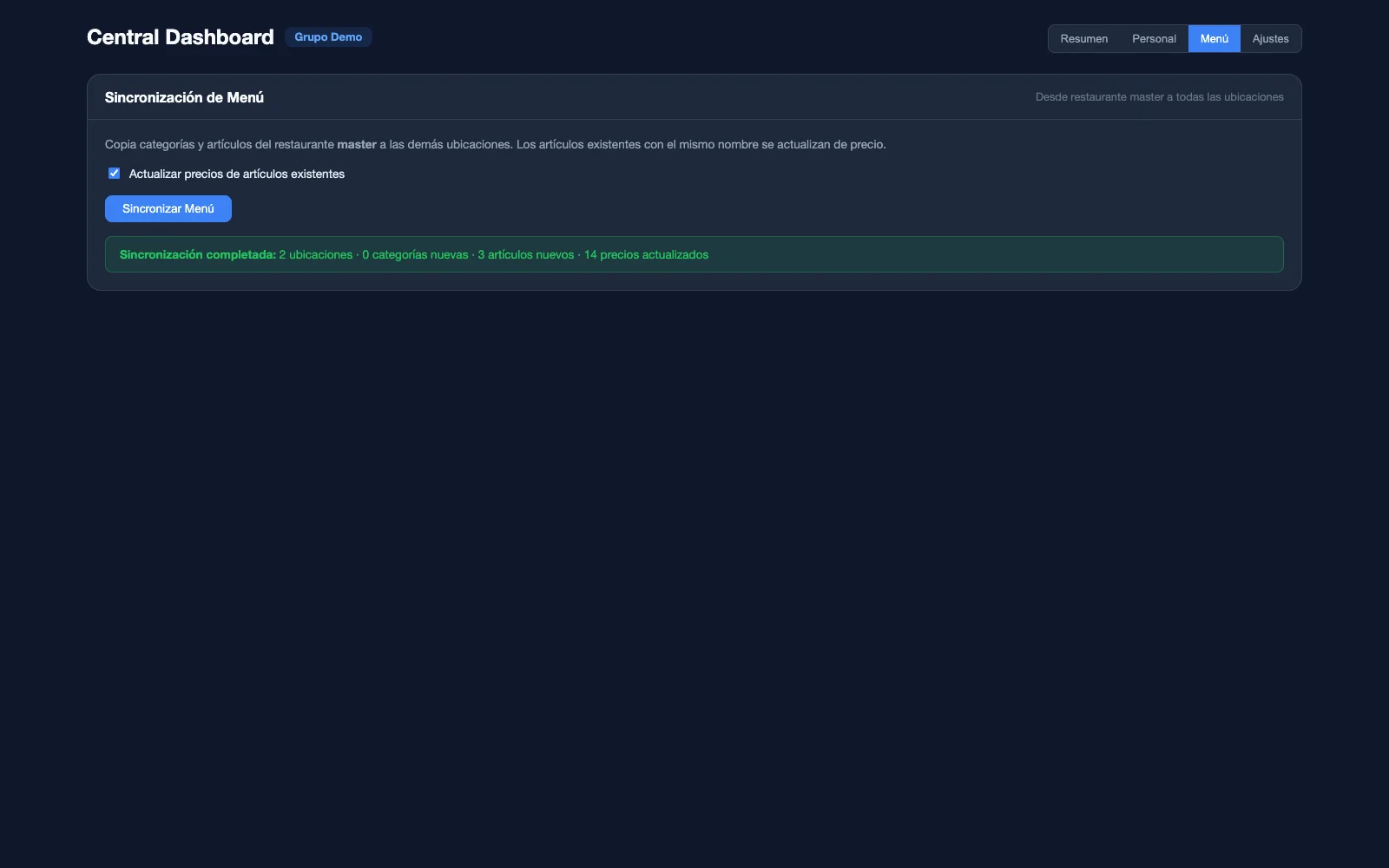
The master venue’s menu reaches the others in one tap: what they are missing is copied and the prices of items with the same name are brought up to date. What is each venue’s own stays untouched.
Solutions · Groups and multi-location
Each venue with its own POS, menu, till and team. Above them, the group’s Central dashboard: what each venue sells, who is working right now, which dishes sell best across all of them, and the master venue’s menu carried to the rest in one step.

8:30 pm · Three venuesThree terraces open and one screen to see how each one is doing.
This is how a group of three venues runs from Mesero’s Central dashboard, with the real design of its screens (Spanish interface) and example data. Scroll slowly: the clock moves with you.
You change the menu at the master venue and the menu sync carries it to the others: it copies the categories and items they are missing, with their variants, modifiers and allergens, and updates the price of those with the same name (a box you can untick).
It deletes nothing: whatever a venue has of its own stays. And VAT doesn’t travel with the copy: new items take each venue’s default rate.
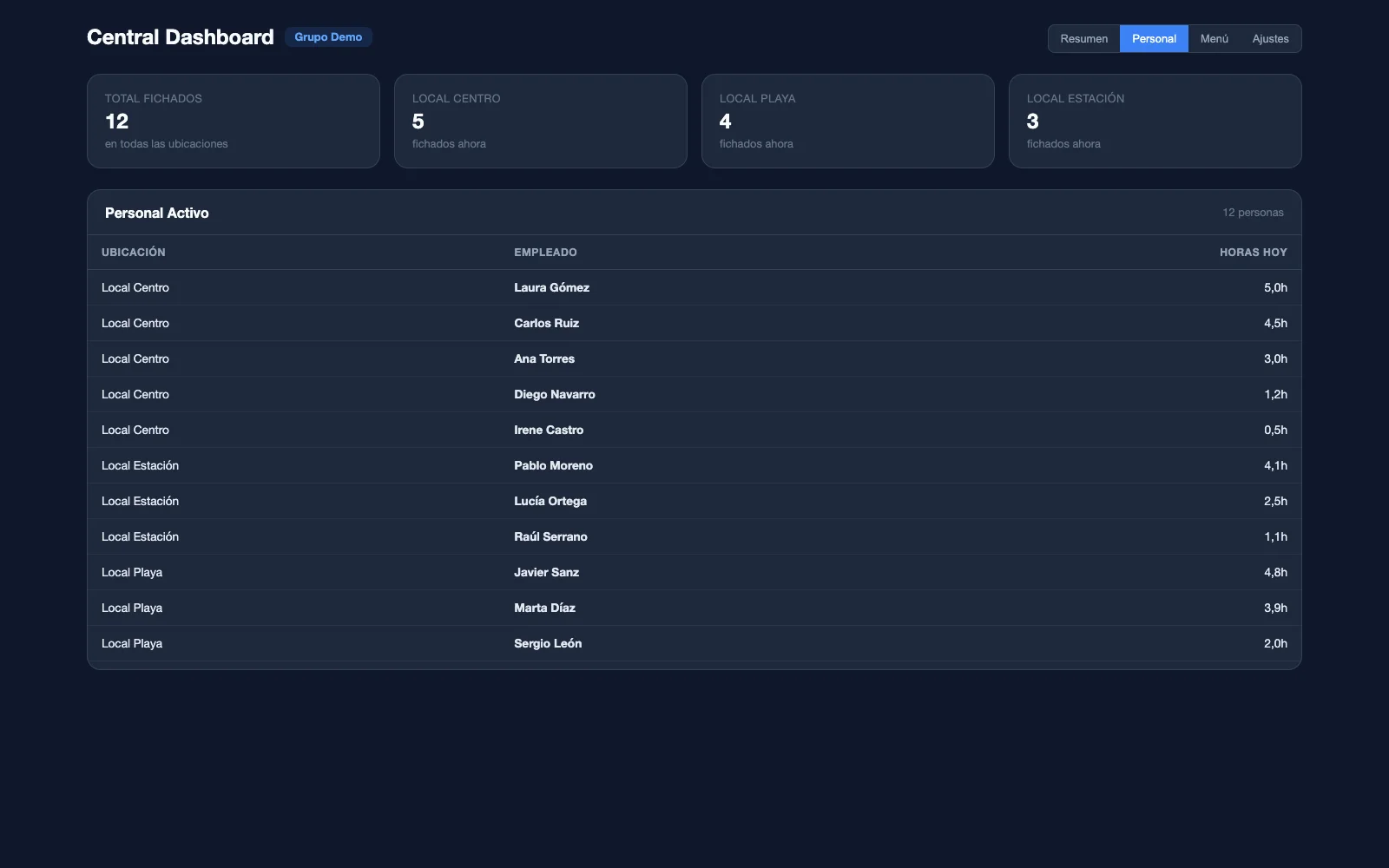
The Staff view brings together everyone clocked in at every venue: how many people are in at each one, who they are and how many hours they have done today. No need to call each manager.
The hours come from each venue’s clock-ins with Mesero Clock-in, its working-time record.
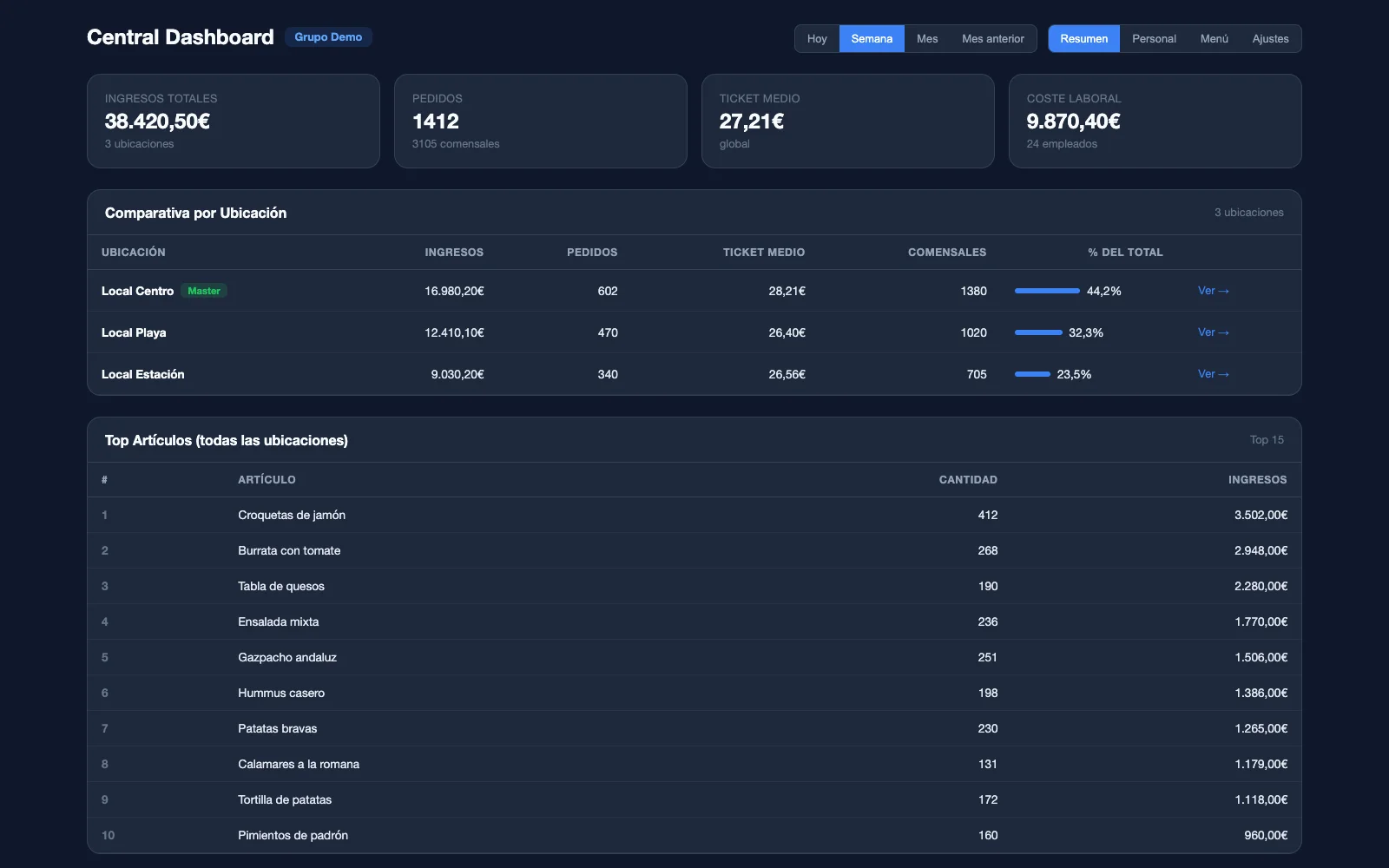
Today, this week, this month or last month: the Summary puts each venue on one row with its revenue, orders, average ticket, diners and share of the group’s total. From the row, View opens that venue’s own dashboard.
It counts what has been paid: each ticket enters the group’s figures as soon as it is closed.
Below, the best-selling items across all the venues at once, by revenue and with their units. What works in one sits next to what works in the rest.
At the top, the labour cost: the hours clocked, minus breaks, times each employee’s hourly rate.
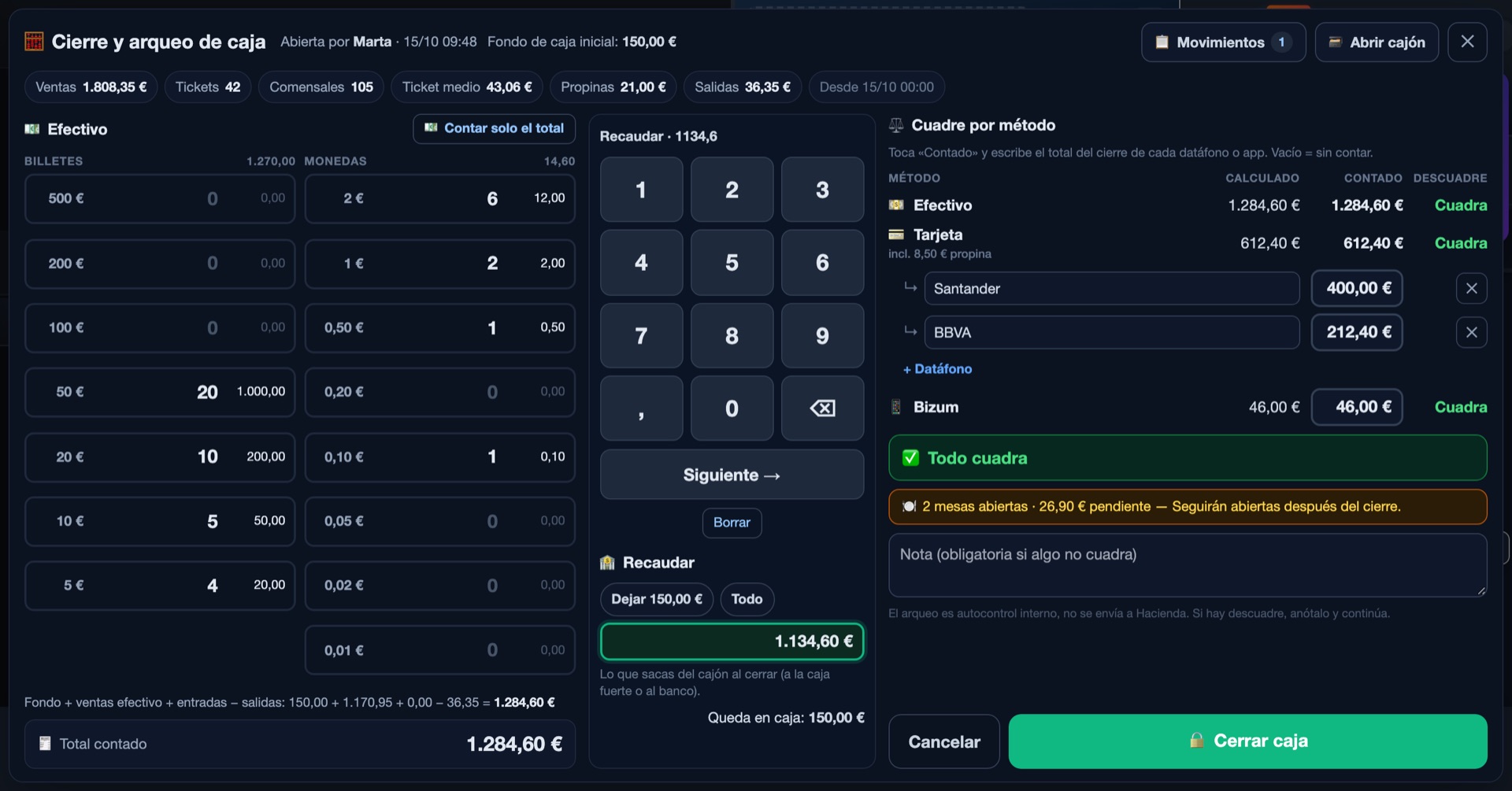
The cash count is done at each venue, with its cash, its card terminals and Bizum. Each one invoices under its own company name and tax number, with its own numbering and its own VeriFactu, even though the group sees them together.
Cash control is included, as in every plan.
With two or three venues, the problem is no longer taking payments: it is knowing how each one is doing without going from one to the next, and keeping the menu and permissions in order. This is what Mesero does about it.
The master venue’s menu reaches the others in one tap: what they are missing is copied and the prices of items with the same name are brought up to date. What is each venue’s own stays untouched.
Each one invoices under its company name and tax number, with its own numbering and its own VeriFactu. It works the same for three venues of one company as for three separate companies.
Who is clocked in at each venue and how many hours they have done today, in one table. The hours come from the working-time record in Mesero Clock-in.
The hours clocked in the period, minus breaks, times each employee’s hourly rate, next to what the group sold over the same dates.
Sales across all the venues, only for those allowed to see reports. Staff, for management. And changes to the group, for the owner or an admin. Each waiter, with their PIN at their own venue.
Every change, who made it and when, with the old and the new value. It also records when Mesero support enters your account.
The Central dashboard isn’t switched on with a button: the Mesero team creates the group with you, adds its venues and marks the master. Each venue is still a Mesero venue, with everything of its own.
How many there are, what each one does and who runs what. With that we prepare a tailored Enterprise proposal.
We create the group, add its venues and choose the master: the venue the menu and prices come from. We do the rollout with you.
Its POS, its menu, its till and its team, like any Mesero venue. The Central dashboard sits on top and doesn’t change how the floor works.
The venues don’t share a spreadsheet: each one works in its own Mesero and the Central dashboard reads from all of them at once. What is paid at one venue’s bar shows up in the group’s figures as soon as the ticket is closed.
Enterprise is from €149/month (€119 billed annually) and includes everything in Pro, with unlimited terminals and users, the Central dashboard and the audit log. For a group we prepare a tailored proposal, with an accompanied rollout.
For solo-operator bars and cafés: just what you need to sell, take payment and stay compliant.
For smaller restaurants that want a cleaner operation without extra complexity.
For growing restaurants that need operations and sales to run from one system.
For groups and franchises that need control, integrations and multi-location visibility.
Prices exclude VAT (21%). Compare what each plan includes →
If your question isn’t here, write to us: a person from the team will answer.
Talk to usEnterprise. The Central dashboard, the menu sync and the audit log belong to that plan, from €149/month (€119 billed annually) and includes everything in Pro. For a group we prepare a tailored proposal based on its venues, and we do the rollout with you.
Yes. The sync copies from the master venue whatever the others are missing and, if you tick the box, brings the price of items with the same name up to date. It deletes nothing, so each venue keeps its own dishes. What is copied takes each venue’s default VAT rate.
Only people with permission to see reports. Staff on shift, management; and removing venues from the group or syncing the menu, the owner or an admin. Each waiter still signs in with their PIN at their own venue.
Yes. Each venue has its own company name and tax number (NIF) on its tickets, its own numbering and its own VeriFactu, which it activates with its certificate. The group sees them together, but each one invoices on its own.
From the hours clocked in Mesero Clock-in over the period you choose, minus breaks, times the hourly rate on each employee’s file. If an employee has no hourly rate, their hours add no cost.
Yes. The 90-day trial includes everything in Enterprise, the Central dashboard too. Write to us and we’ll set up the group with your venues so you can try it with your own data.
Tell us how many venues you have and how you work. We’ll prepare a tailored proposal and set up the group with you, with your venues and your data.