Daily report
Sales including VAT, orders, average ticket and covers, takings by payment method and the three best-selling dishes, with a button to the detail.
Analytics · Sales reports
Sales by hour, by day and by dish, compared with the previous period or with last year. Mesero tells you your peak hour, your best day and your best-selling dish without you looking for them, and every morning it emails you the day's summary.
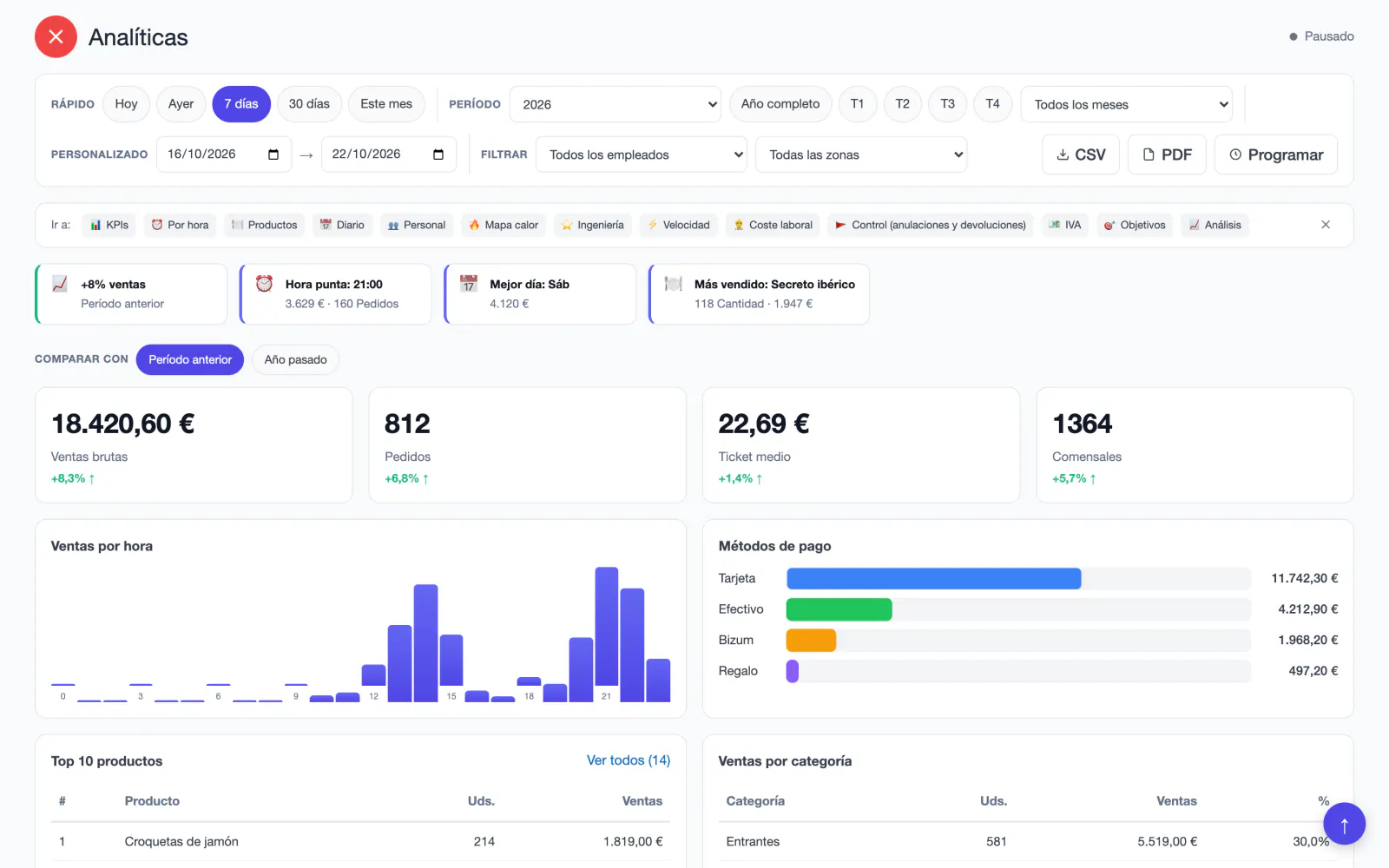
When you open Analytics, Mesero reads the period for you and flags what deserves attention: whether revenue is up or down on the previous period, which day concentrates your bookings, what no-shows cost you, or whether the queue walks away before being seated.
Below, the usual figures, each with its arrow against the previous period: gross sales, orders, average ticket and covers. Tap any of them to open the detail.
The sales reports open from the dashboard, on a computer, a tablet or a phone. Pick the period and everything else is recalculated: the figures, the comparisons, the hours, the dishes and the team.
Today, yesterday, 7 days, 30 days or this month, with one tap. Or a whole year, a quarter or a month, or any dates you like.
And if you want, filter by waiter or by area: every section is recalculated with their sales only.
Every figure carries its change against the previous period of the same length, or against the same dates last year: gross sales, orders, average ticket and covers.
Sales hour by hour, payment methods, the ten best-selling dishes and sales by category, with the share of each.
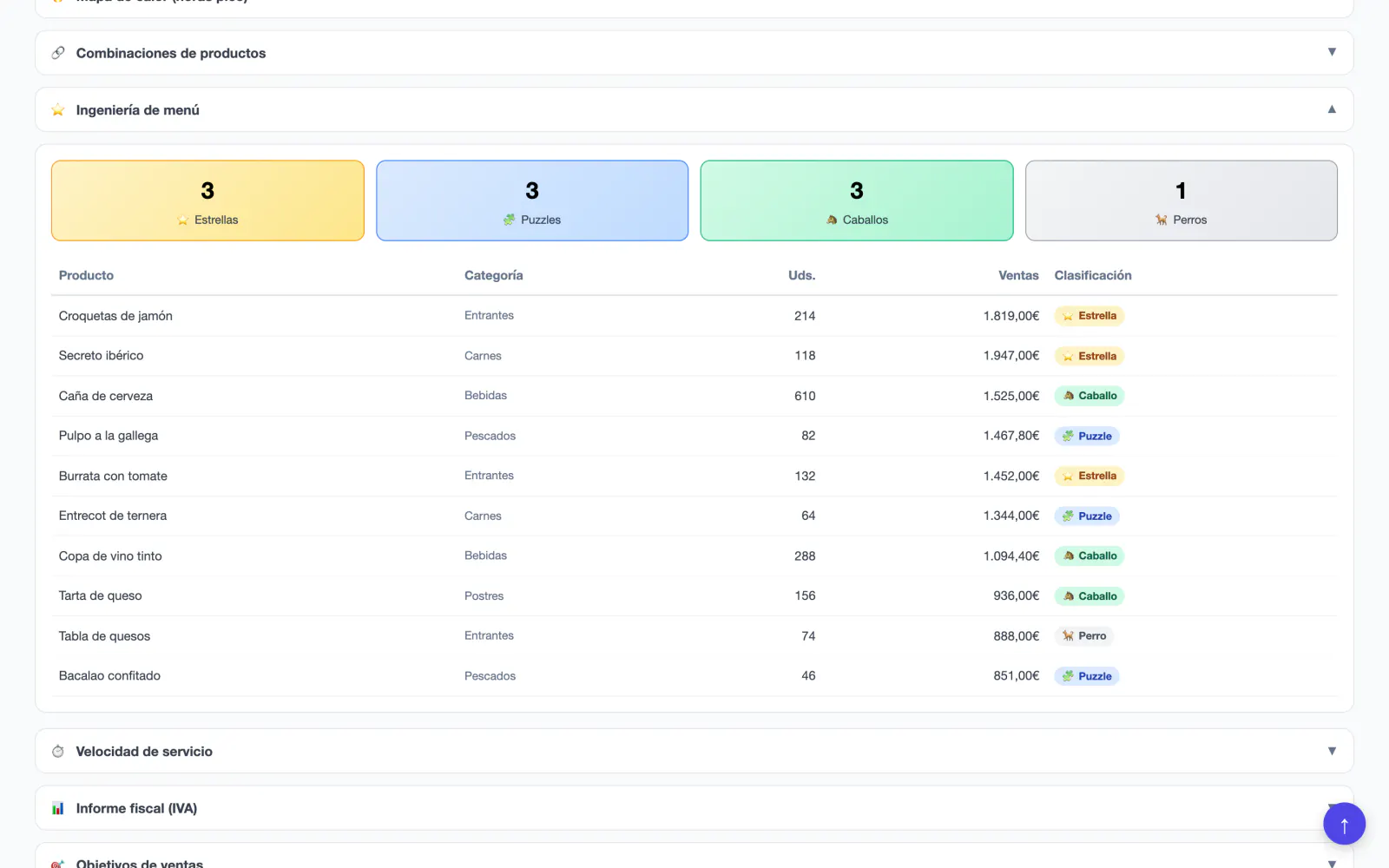
Menu engineering sorts every dish by how much it sells and how much it makes: stars, puzzles, plowhorses and dogs. The margin comes from your dishes' cost when they all have one; otherwise the price stands in.
The product analysis suggests keeping, promoting, repricing, reviewing or removing each one.
Export any period as a PDF or a CSV, or schedule it: a daily and a weekly summary to the email address you choose, your accountant's included. And in live mode the screen refreshes itself every minute during service.
Below the figures, every report has its own section that opens when you need it. All of them use the same period and the same filters.
Analytics puts sales next to the floor: the waiting list, the bookings and your customers, in tabs over the same period.
The daily report arrives in the morning, or at the hour you choose, and only on days you have sold. It is switched on when you create your restaurant and switches off with one link.
Sales including VAT, orders, average ticket and covers, takings by payment method and the three best-selling dishes, with a button to the detail.
The whole week on the day and at the hour you choose, if you switch it on. Both can go to another address, your accountant's for example.
Any period, as a PDF to read or a CSV for your spreadsheet, from the reports or from Analytics.
Nothing to import or reconcile by hand: every sale, booking, clock-in and customer is already in Mesero, and the reports read them from there.
Analytics, the sales reports and menu engineering come with Pro and Enterprise, with no extra module. What you need to close the day is on every plan.
Full analytics and sales reports: comparisons, heat map, team, menu engineering, forecast and alerts.
The free trial includes analytics, so you see them with your own restaurant's sales.
The Z report, the CSV export of sales, products and categories, and the daily email report, on Barra and Starter too.
If your question is not here, write to us: a person from the team replies.
Talk to the teamAnalytics, the sales reports and menu engineering are on the Pro and Enterprise plans, and in the 90-day free trial. On Barra and Starter you get the Z report, the CSV export of sales, products and categories, and the daily email report.
Yes. Every figure is compared with the previous period of the same length or with the same dates last year. The period can be a day, a week, a month, a quarter, a year or any dates you choose.
The owner, administrators and managers, and anyone with the permission to view reports. A waiter without that permission does not see the restaurant's figures.
The paid orders of the period, whether they come from the POS, the waiter's phone or QR. Open or cancelled orders stay out of the analysis, and refunds are shown separately.
It sorts every dish by how much it sells and how much it makes against your menu's average: stars sell and make a margin, plowhorses sell with a thin margin, puzzles make a margin but sell little, and dogs do neither. The margin comes from your dishes' cost when they all have one; otherwise the price stands in.
Yes. The daily and the weekly report go to the email address you choose. And any period can be exported as a PDF or a CSV from the reports.
90 days free, no card and everything included. Your first daily report arrives the morning after your first sale.