Cash control

The till close that accounts for every euro.

Cash, every card terminal and Bizum on one screen, with no scrolling. When something is off, Mesero tells you how much, in which method and why, and nobody closes without explaining it.

Count by noteSeveral card terminalsBlind countChecked openingDay summary
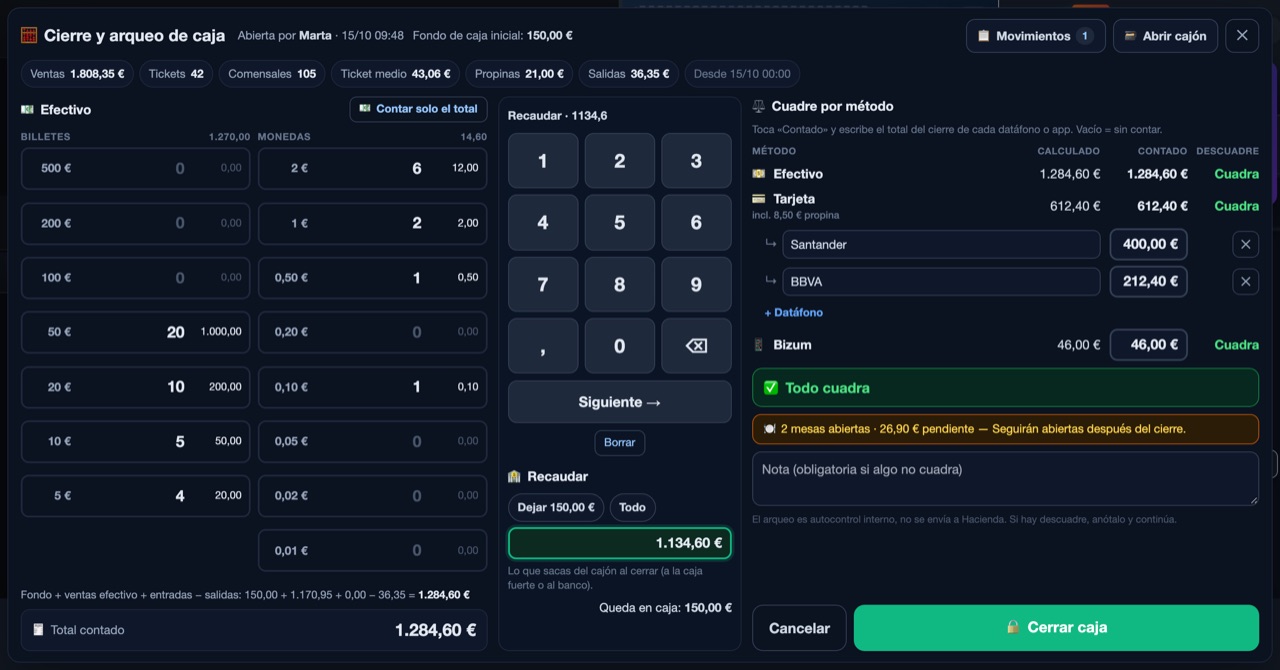
Mesero's till close screen: cash counted by note, card split across two terminals, Bizum, and everything matching.
The real POS screen (Spanish interface, example data): everything matches.
Every method reconciled

431 € missing? No: 5 €.

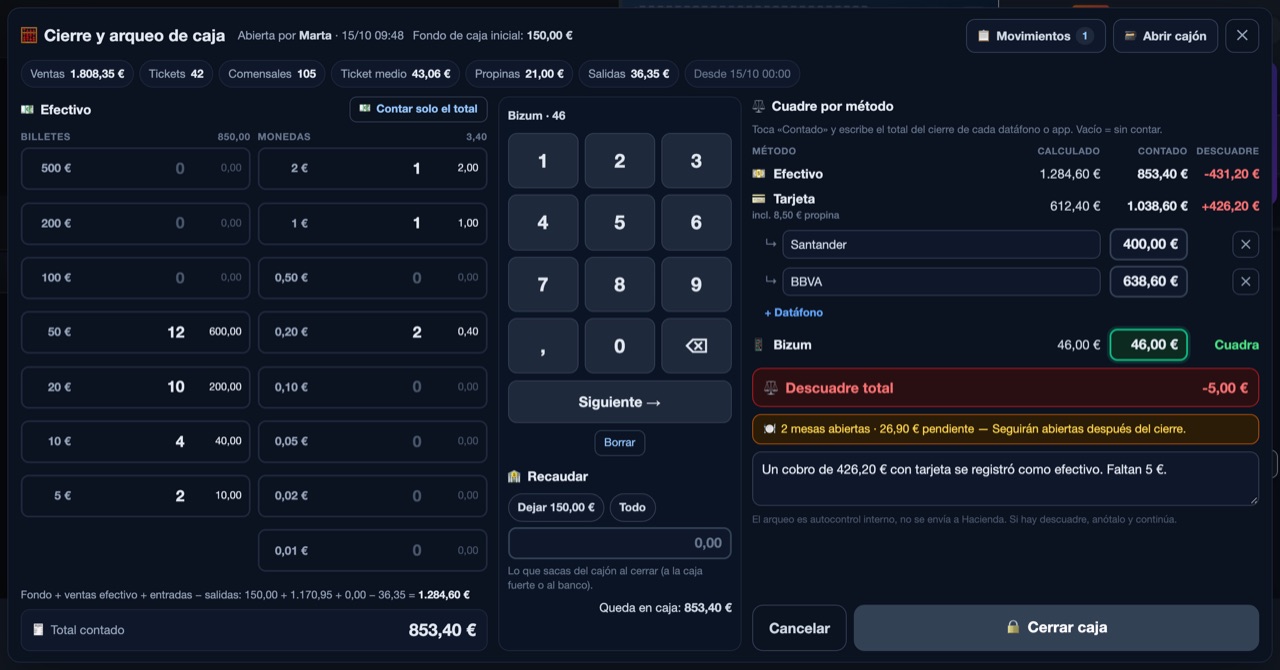
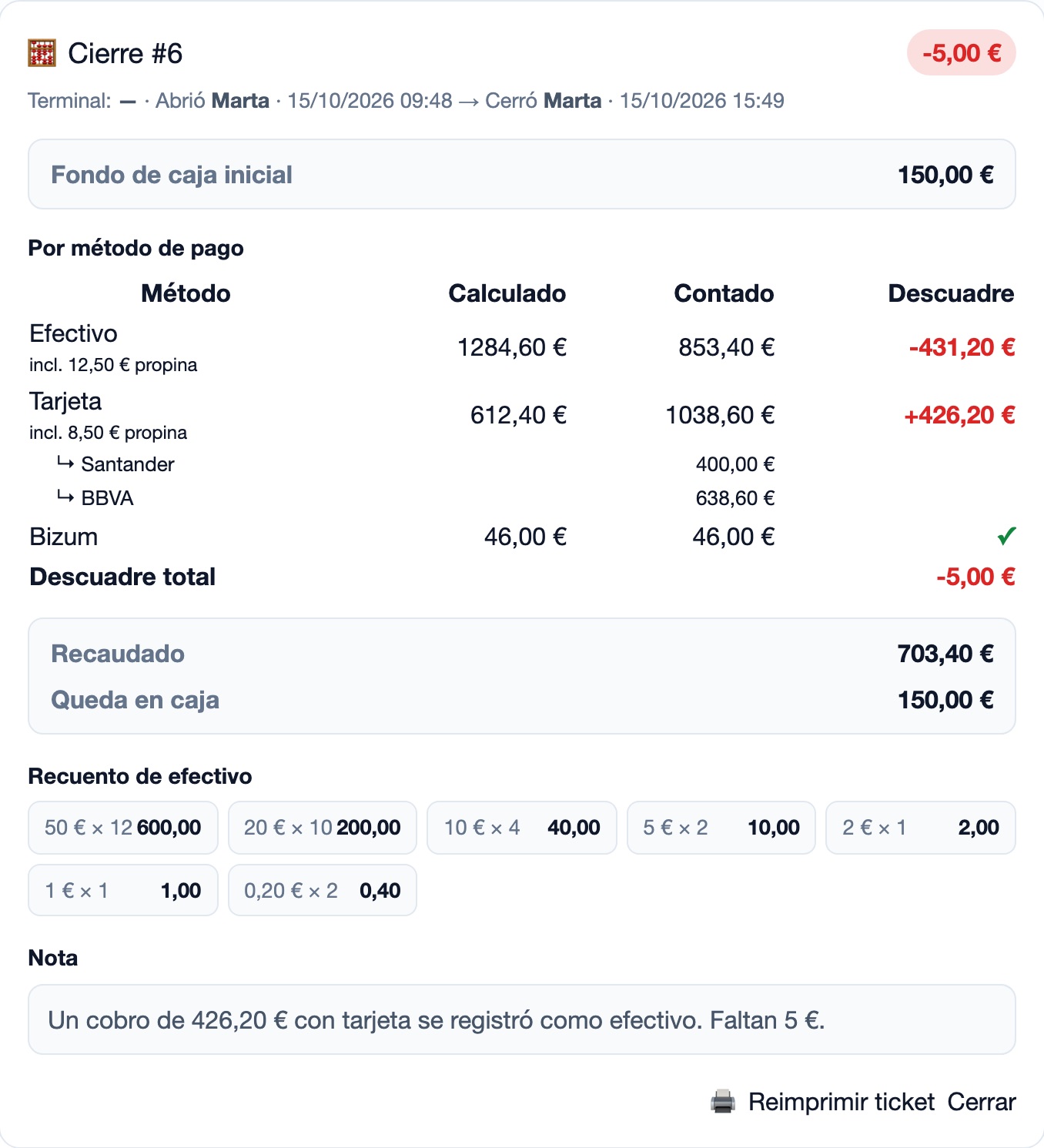
A 426.20 € payment went through the card terminal but was recorded as cash. A close that only checks the cash says 431.20 € is missing, and the hunt begins. Mesero reconciles every method at once: the cash comes out short, the card comes out over by almost the same amount, and the net difference shows what is really missing.

Cash−431.20 €Counted against the cash payments.
Card+426.20 €Both terminals against the card payments.
Net difference−5.00 €What is really missing, with its reason written down.
A close that does not match: cash minus 431.20 euros, card plus 426.20 euros and a net difference of minus 5 euros, with the reason written.
The same close on screen: each method with its difference, the net difference and the reason, which is required to close.
How it works

Four steps, one screen.

On the POS tablet or computer the whole close fits on screen: the count on the left, one big keypad in the middle and the reconciliation on the right. Nobody has to scroll to find the close button.

  1. Count the cash

    By note and coin, or just type the total. One keypad works for every field.

  2. Type each card terminal's total

    With two banks, each terminal gets its own line, and Mesero remembers their names for the next close. What the card should show already includes the card tips, like the terminal's own report. Bizum, transfers and vouchers work the same way.

  3. Check the reconciliation

    Each method turns green or red as you type, with the net difference. If something does not match, the close asks for a reason. Whatever you do not count is recorded as "not counted", never as matching.

  4. Take the takings, leave the float

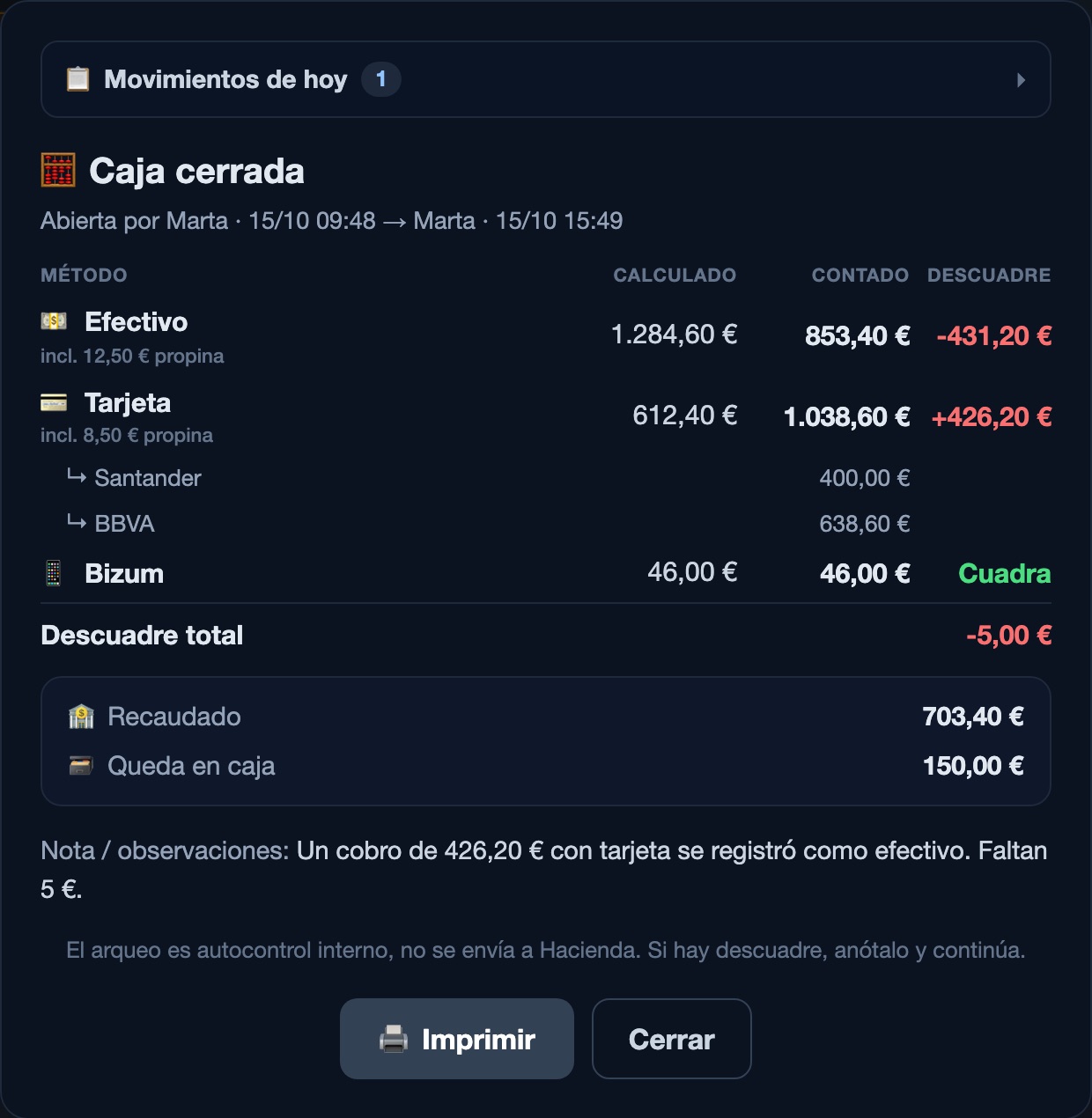
    Say what leaves the drawer — leave the float or take it all — and the till closes with what stays for tomorrow. The cash-up ticket comes out of the printer.

Till closed: expected, counted and difference per method, the cash taken out, what stays in the drawer and the reason given.
After the close: the takings, what stays in the drawer for tomorrow and the button to print the cash-up.
Control without watching anyone

The till sets the rules, not the manager.

Most differences are mistakes, not theft. But a close that lets people close without explaining anything, or open with less money than there was, invites both. These rules enforce themselves, every shift.

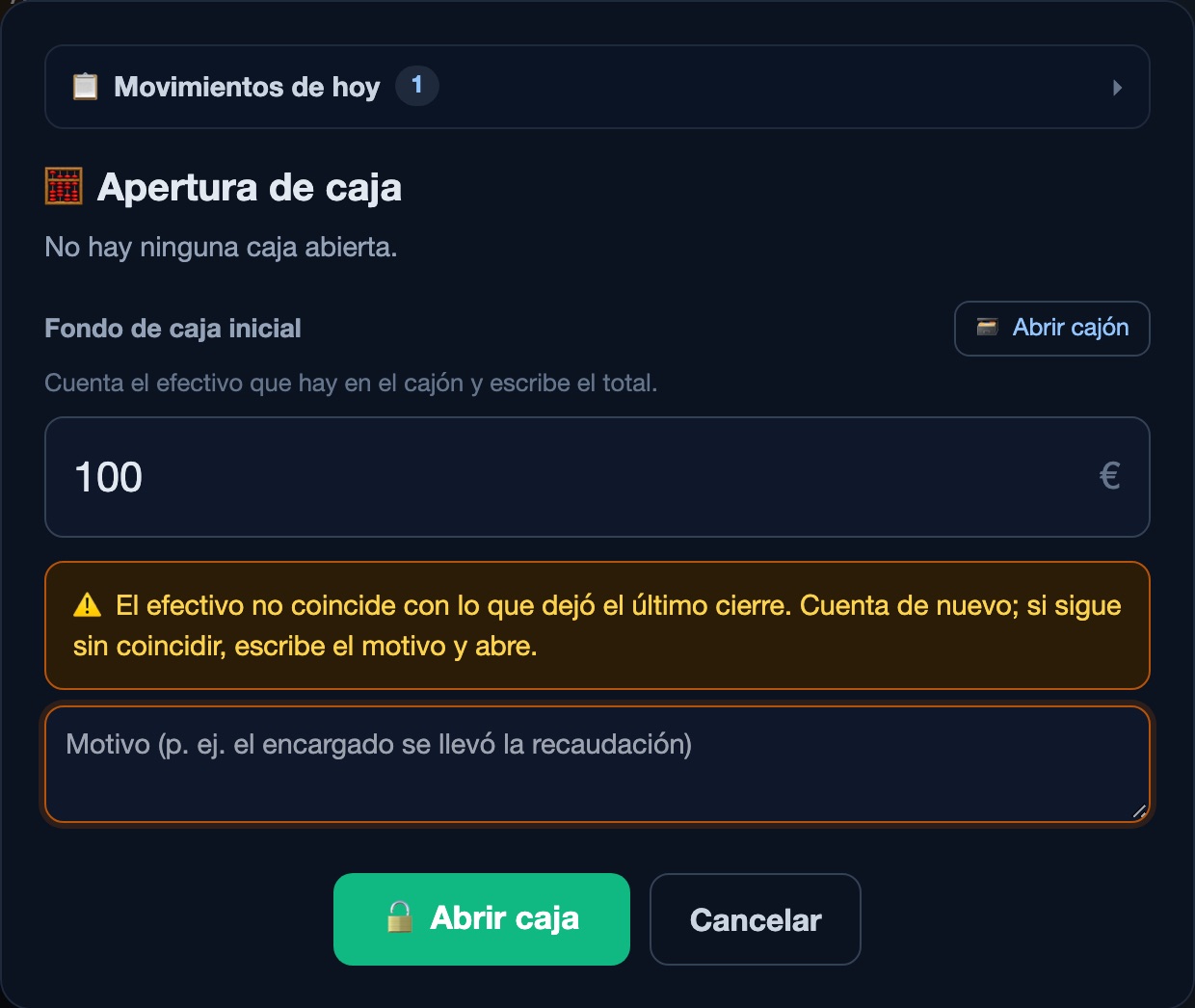
A waiter opening the till: the cash counted does not match what the last close left, and the till asks for a reason before opening, without showing how much should be there.
A waiter opens the till with a figure that does not match: they must write a reason, and they do not see how much should be there.

What the till does for you

  • Blind count. Staff who may not see reports count without knowing how much should be there. They only learn whether it matches.
  • Checked opening. Whoever opens counts the drawer. If it does not match what the last close left, plus the cash taken since, they must write a reason, and you see it.
  • No difference without a reason. Not in the cash, not on a card terminal: the till does not close until it is explained.
  • Manager PIN, if you want it, to open and close the till and to take money out, employee by employee.
  • Drawer log. Every time the drawer opens it is recorded with who, when, from which terminal and why, with the receipt photo when it is a payment.
  • Open tables. Before closing, the till warns about tables still open with money owed.
For the owner

Every close, kept in full detail.

From the dashboard you see each close exactly as it was left: who opened and who closed, at what time, what was expected and counted for each method, the split across terminals, the count by note, the takings and the reason for each difference.

What is recorded

  • Close history with its verdict, matched or the difference, and the net difference for the period.
  • Opening differences, flagged in the history with what should have been there and the opener's reason.
  • Cash movements: cash in, drops, supplier payments and tip-outs, with who made them.
  • The day's summary inside the close for those allowed to see it: sales, tickets, covers, average ticket, tips and cash out.
  • Cash-up ticket to print or reprint any time. A waiter's prints blind: only what they counted.
A close in the Mesero dashboard: opening float, expected, counted and difference per method, the card terminals, the takings, the count by note and the note.
One close in the owner's dashboard (Spanish interface).
Compared

What changes from a typical till close.

Many POS systems reconcile the cash and leave the rest to guesswork. These are the differences you notice the first night something does not add up.

At the close Mesero Typical till close
What gets reconciledCash, each card terminal, Bizum and every other methodThe cash; the rest is assumed
A payment under the wrong methodNet difference: you see what is really missingOne difference per method, no net
Card tipsIncluded in what the terminal should showThe terminal looks "over" by the tips
What the waiter seesBlind count: only whether it matchesWhat should be there, before counting
Opening with less moneyThe opening is checked and needs a reasonNobody notices
Closing with a differenceOnly with the reason writtenDepends on who closes
On screenEverything visible, no scrollingScroll down to reach the close button
Price

Included in the POS.

Cash control is not an add-on: it comes with every POS plan, alongside receipts, printing and VeriFactu.

No charge per close

Close as often as you like: per shift, per day or whenever the person running the till changes.

Your usual card terminal

You type the total from its end-of-day report. Your bank's terminal works as it is, without changing payment provider.

From the phone too

The till also opens and closes from the Mesero Comandas app, on the same till as the venue.

See plans and pricing →

FAQ

What people ask before their first close.

What is a till reconciliation (cash-up)?
Checking, at closing time, that the money you have matches what was charged: the cash in the drawer and the total on each card terminal or payment app. In Mesero it happens on one screen, and the system works out what should be there from the payments, the tips and the cash movements of the shift.
What if the card terminal does not match?
The close shows it in red with the difference and asks for a reason before closing, exactly as it does for cash. When the cash comes out short and the card comes out over by almost the same amount, the net difference shows what is really missing: nearly always one payment recorded under the wrong method.
Can waiters see how much should be in the till?
Not if they are not allowed to see reports. They count blind: they type what is there and only learn whether it matches. What was expected, the differences and the reasons are for the manager or the owner.
What if someone opens the till with less money than the last close left?
Whoever opens counts the drawer. If the count does not match what the last close left, plus the cash taken since, they must write a reason to open, and the owner sees the difference and the reason in the history and on the printed cash-up.
Do card tips make the card terminal look over?
No. What the card should show includes the tips charged on it, like the terminal's own end-of-day report, and the screen says how much of it is tips. Cash tips count towards the drawer.
Is the cash-up sent to the Spanish tax agency?
No. The cash-up is an internal control for the venue. What goes to the tax agency are the receipts and invoices, which Mesero issues under VeriFactu.
Next step

Do your next close in Mesero.

90 days free, no card. The first close that does not match will already tell you where the difference is.

EverymethodCash, card terminals, Bizum.
Blindfor the teamThey only learn if it matches.
A reasonfor each differenceAt closing and at opening.
OnescreenNo scrolling.